- A software engineering post-graduate and technology writer. I build open-source projects, explore Linux & cloud technologies, and share deep-dive blogs on tech. - Obsessed with Linux and cloud tech, I share deep dives into OS, tools, tutorials, cloud tricks, and the occasional algorithm adventure.
- This isn’t a polished “blog hub”—it’s my open notebook: raw notes, daily experiments, and lessons learned.
GitHub Actions: Turns Out It’s Not Witchcraft
GitHub Actions Demystified: Turns Out It’s Not Witchcraft 1. What is CI/CD in DevOps ? CI/CD (Continuous Integration and Continuous Deployment) is a development practice that automates the process of testing, building, and deploying code. With CI, every code change is automatically tested to ensure nothing breaks. CD then takes it further by deploying those verified changes to production without manual effort. Together, they help developers release updates faster, more reliably, and with fewer bugs. ...
Setting Up a Windows 11 VM with virt-manager (Without Losing Your Mind)
Setting Up a Windows 11 VM with virt-manager (Without Losing Your Mind) Introduction So you want to run Windows 11 in a virtual machine on Linux? Excellent choice! Whether you need it for testing, running that one annoying Windows-only app, or just want to see what Microsoft is up to these days, this guide will walk you through creating a properly optimized Windows 11 VM using virt-manager. The beauty of what we are doing today is that we’re going to use VirtIO drivers (which are way faster than the default emulated hardware) and add some Hyper-V enlightenments to make Windows think it’s running on native Microsoft hypervisor technology. This makes everything smoother and faster. ...
Docker CLI Cheat Sheet: More then you need to be PRO.
Docker CLI Cheat Sheet: Complete Reference Guide Container Lifecycle Run a container from an image docker run [OPTIONS] IMAGE [COMMAND] Creates and starts a container from a specified IMAGE. This is the primary command for getting a container up and running, allowing you to execute an optional COMMAND inside it. Run container in background docker run -d IMAGE Runs the container in detached mode, meaning it runs in the background. The command prints the container ID and exits the terminal, allowing you to continue using your shell. ...
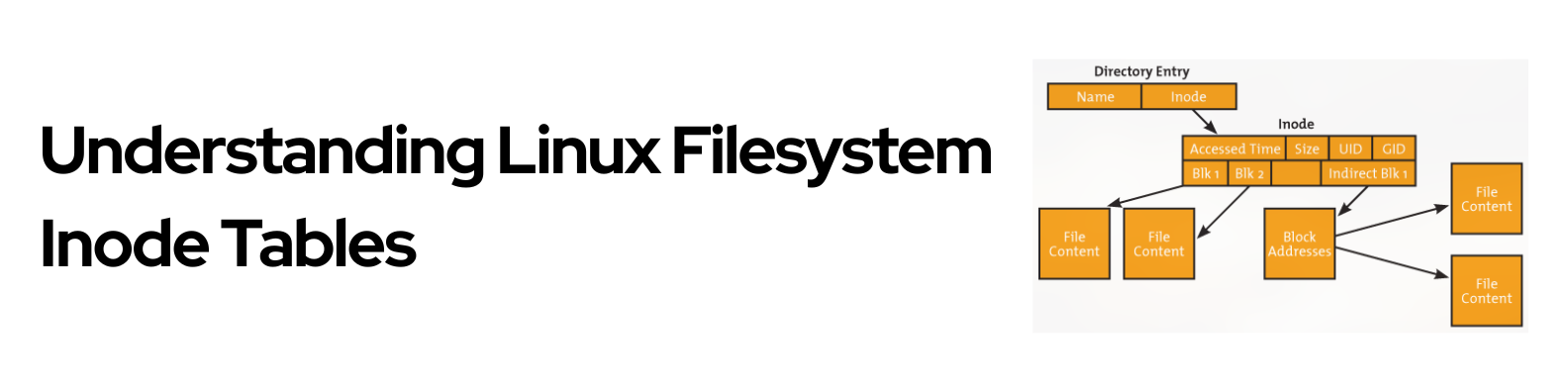
Understanding Linux Filesystem Inode Tables
Introduction The inode table is one of the most fundamental data structures in Linux filesystems, yet it remains mysterious to many users. An inode, short for index node, is essentially a data structure that stores all the metadata about a file or directory except for two crucial pieces of information: the filename itself and the actual file content. This separation of concerns is what makes Unix-like filesystems elegant and efficient. ...
The Power of the Pipe: Chaining Linux Commands for Efficiency
One of the most powerful and elegant features of the Linux command line is the pipe, represented by the vertical bar: |. It looks simple, but this little symbol is the secret weapon for turning a handful of small, simple commands into a single, powerful tool. What Does the Pipe (|) Do? In the simplest terms, the pipe takes the output of one command and feeds it directly as the input to a second command. ...